If you are interested in technology but still find terms such as IP address, RAM, operating system, database, virtualization, or encryption slightly intimidating, CompTIA Tech+ FC0-U71 is designed for exactly this stage of your learning journey.
Tech+ is CompTIA’s foundational technology certification. Rather than expecting candidates to already work as system administrators, network engineers, or cybersecurity analysts, it focuses on building the technical vocabulary and core concepts that make those more advanced subjects easier to understand later.
That makes the CompTIA Tech+ certification particularly relevant to students, career changers, advanced computer users, and professionals who work with technology without necessarily working inside an IT department.
At the same time, FC0-U71 should not be dismissed as a simple computer-literacy test. The exam touches hardware, operating systems, networking, cloud computing, software development, databases, artificial intelligence, troubleshooting, and cybersecurity. The individual topics are introductory, but the scope is surprisingly broad.
In this guide, I will break down what the CompTIA Tech+ FC0-U71 exam covers, how much value the certification provides, which networking concepts deserve extra attention, and how I would approach studying for the exam as a beginner.
What Is CompTIA Tech+?
Table of Contents
ToggleCompTIA Tech+ is an entry-level certification intended to validate a broad understanding of modern information technology.
The certification sits near the beginning of the CompTIA learning path. Its role is different from certifications such as CompTIA A+, Network+, or Security+. Those certifications begin moving toward professional technical roles, while Tech+ establishes the foundation that makes those certifications easier to study.
Tech+ is also the modern successor to the older CompTIA IT Fundamentals+ certification. If you find older training materials referring to ITF+ or exam FC0-U61, make sure your preparation is aligned with the current FC0-U71 certification exam.
The biggest advantage of Tech+ is breadth. Candidates are introduced to multiple areas of IT before deciding whether they want to specialize in technical support, networking, cloud computing, software development, data, or cybersecurity.
CompTIA Tech+ FC0-U71 Exam Overview
| Exam Detail | FC0-U71 Information |
|---|---|
| Certification | CompTIA Tech+ |
| Exam Code | FC0-U71 |
| Number of Questions | Maximum of 70 |
| Question Type | Multiple-choice |
| Exam Duration | 60 minutes |
| Passing Score | 650 |
| Recommended Audience | High school students, advanced end users, and non-IT professionals |
The 60-minute time limit means you should be comfortable recognizing concepts relatively quickly. Fortunately, Tech+ is not designed around deep command-line administration or complex network configuration.
Most questions are more concerned with whether you understand what a technology does, when it should be used, and how it relates to other technologies.
Before beginning your preparation, it is useful to review a structured CompTIA Tech+ FC0-U71 exam preparation resource alongside the official objectives so that you can identify which topics require the most attention.
CompTIA Tech+ FC0-U71 Exam Domains
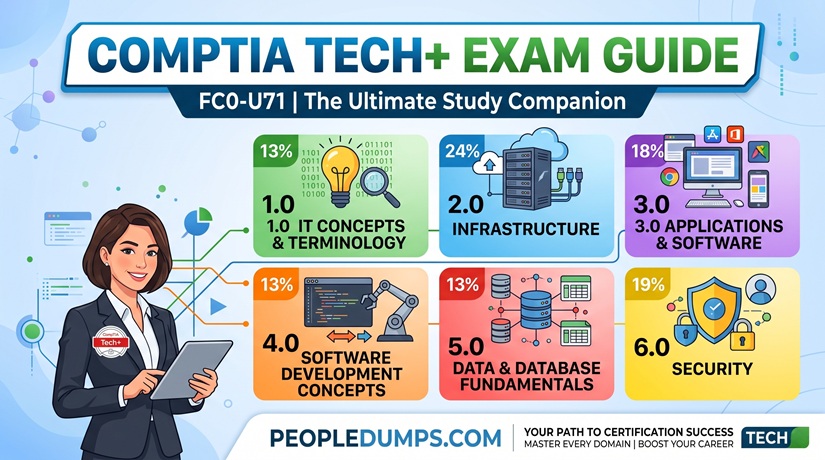
The FC0-U71 exam is organized into six major domains.
| Domain | Weight |
|---|---|
| 1.0 IT Concepts and Terminology | 13% |
| 2.0 Infrastructure | 24% |
| 3.0 Applications and Software | 18% |
| 4.0 Software Development Concepts | 13% |
| 5.0 Data and Database Fundamentals | 13% |
| 6.0 Security | 19% |
One useful observation immediately stands out: Infrastructure and Security account for 43% of the exam. These two areas deserve significant attention during your FC0-U71 preparation.
Domain 1: IT Concepts and Terminology – 13%
This domain establishes the vocabulary used throughout the rest of the exam.
You should understand the basic computing process of input, processing, output, and storage. Candidates also need to recognize common units used to describe storage capacity, processor speed, and network throughput.
Expect concepts such as:
- Bits and bytes
- Kilobytes, megabytes, gigabytes, terabytes, and petabytes
- Mbps and Gbps
- MHz and GHz
- Binary and hexadecimal notation
- Basic computing concepts
- Structured troubleshooting methodology
The troubleshooting process deserves more attention than many beginners give it. Technical professionals should not simply try random fixes until something starts working.
A better process is to identify the problem, establish a probable cause, test the theory, implement a solution, verify functionality, and document the outcome.
That mindset becomes increasingly important if you later study CompTIA A+, Network+, or professional vendor certifications.
Domain 2: Infrastructure – 24%
Infrastructure is the largest domain on the CompTIA Tech+ FC0-U71 exam, and it covers both computer hardware and networking.
You should be able to recognize the purpose of components such as:
- Motherboards
- CPUs
- GPUs
- RAM
- HDDs
- SSDs
- NVMe storage
- Network interface cards
- Firmware and BIOS
- External peripherals
You are not expected to become a hardware repair specialist, but you should understand the role each component plays.
For example, you should know why adding RAM is different from increasing storage capacity, why SSDs behave differently from traditional hard drives, and why a network interface card is required for network connectivity.
Cloud Computing and Virtualization
Modern IT infrastructure is not limited to physical computers, so Tech+ also introduces virtualization and cloud technologies.
You should understand concepts including:
- Hypervisors
- Guest operating systems
- On-premises infrastructure
- Cloud environments
- Hybrid environments
- Infrastructure as a Service (IaaS)
- Platform as a Service (PaaS)
- Software as a Service (SaaS)
For beginners, the important thing is understanding the difference between these models rather than memorizing vendor-specific cloud products.
For example, SaaS generally provides a completed software application to the user, while IaaS gives an organization more direct control over computing infrastructure.
Networking Concepts You Need for FC0-U71
Networking is one of the most useful parts of Tech+ because nearly every modern computer, mobile device, cloud service, and business application depends on network connectivity.
The networking depth is still introductory, but the concepts are important enough that I would not recommend simply memorizing definitions.
LAN vs. WAN
A Local Area Network (LAN) normally connects devices within a relatively limited environment such as a home, school, office, or building.
A Wide Area Network (WAN) connects networks across larger geographic areas. The Internet is the most familiar example of large-scale interconnected networking.
IP Address vs. MAC Address
This is a classic beginner topic.
An IP address provides logical addressing that allows devices to communicate across IP networks. A MAC address identifies a network interface at the data-link level.
You do not need advanced subnetting skills for Tech+, but you should understand that these two identifiers serve different purposes.
Router vs. Switch vs. Access Point
Another common source of confusion is the difference between networking devices.
- Switch: connects devices within a network.
- Router: forwards traffic between different networks.
- Wireless access point: provides wireless connectivity to a network.
- Modem: provides connectivity to certain types of Internet services.
- Firewall: controls network traffic according to security rules.
Do not just memorize these definitions. Imagine a small office and ask yourself where each device would sit and what problem it solves.
Common Internet Connection Types
FC0-U71 also expects you to recognize common Internet connectivity technologies, including:
- Fiber optic
- Cable
- DSL
- Cellular
- Satellite
- Other wireless connectivity
A good study method is to compare them in terms of speed, latency, availability, physical media, and typical use cases.
Wi-Fi Fundamentals
Wireless networking is especially relevant because candidates may be expected to understand the basic capabilities of a small wireless network.
Important topics include:
- 802.11n
- 802.11ac
- 802.11ax
- 2.4 GHz
- 5 GHz
- 6 GHz
- Wireless interference
- Signal attenuation
- Speed considerations
You do not need to design an enterprise wireless network, but you should understand that different frequency bands and Wi-Fi standards have practical trade-offs involving coverage, interference, compatibility, and performance.
Domain 3: Applications and Software – 18%
This section moves from infrastructure to the software users interact with every day.
Candidates should understand the basic purpose and characteristics of operating systems and application software.
Topics may include:
- Desktop operating systems
- Mobile operating systems
- File systems and file management
- Application installation
- Software licensing concepts
- Web browsers
- Browser configuration
- Productivity applications
- Artificial intelligence technologies
Artificial Intelligence in Tech+
One of the more modern aspects of FC0-U71 is its recognition that basic technology literacy now includes artificial intelligence.
Beginners should be familiar with common AI use cases and understand technologies such as AI-powered assistants, chatbots, and generative AI at a conceptual level.
The exam is not asking you to train a large language model or become a machine-learning engineer. Instead, you should understand where AI may be used, what it can help accomplish, and why human review, security, privacy, and responsible use still matter.
Domain 4: Software Development Concepts – 13%
The phrase “software development” sometimes makes beginners nervous, but Tech+ is not a programming certification.
You are not expected to build a large application during the exam.
Instead, the objective is to understand how programming works at a conceptual level.
You should become familiar with subjects such as:
- Programming language categories
- Compiled and interpreted languages
- Variables
- Constants
- Data types
- Functions
- Loops
- Conditional logic
- Basic programming structures
- Software development concepts
If you have never programmed before, writing a few very small Python examples can make this domain much easier to understand.
Even something as simple as creating a variable, writing an if statement, and running a loop can turn abstract definitions into something concrete.
Domain 5: Data and Database Fundamentals – 13%
Almost every modern business application depends on data, so Tech+ introduces candidates to basic database concepts.
You should understand what databases are used for and how structured data differs from simply storing unrelated files in folders.
Important concepts include:
- Database purpose
- Tables
- Rows and records
- Columns and fields
- Primary keys
- Relationships
- Queries
- Data types
- Data backup
- Data restoration
- The business value of data
You do not need to become a database administrator, but having a basic understanding of relational databases will help enormously when you later work with business applications, cloud platforms, analytics systems, or software development.
Domain 6: Security – 19%
Security is the second-largest FC0-U71 domain, which makes sense. Cybersecurity is no longer a specialized concern that only security teams need to understand.
Every technology user should understand basic security principles.
Study areas include concepts such as:
- Confidentiality, integrity, and availability
- Authentication
- Authorization
- Strong passwords
- Multi-factor authentication
- Least privilege
- Malware
- Phishing
- Social engineering
- Device security
- Software updates
- Encryption
- Data protection
- Secure wireless networking
- Physical security
Think About Security as Risk Management
One mistake beginners make is treating cybersecurity as a list of attack names to memorize.
A better way to think about security is to ask three questions:
- What asset are we trying to protect?
- What threat could affect that asset?
- What control reduces the risk?
For example, a password helps protect an account, multi-factor authentication adds another layer of verification, encryption protects data from unauthorized reading, and a firewall helps control network traffic.
This way of thinking will also prepare you for certifications such as CompTIA Security+ later.
Is CompTIA Tech+ Worth It?
The answer depends heavily on your current experience.
For someone completely new to IT, I think Tech+ can be valuable because it provides a structured learning path across several technical disciplines.
It helps answer a question many beginners struggle with: What exactly should I learn first?
Instead of randomly watching videos about programming, cybersecurity, computer hardware, and networking, FC0-U71 provides an organized framework.
Tech+ Makes Sense If You Are:
- A high school or college student exploring technology careers
- A career changer with little formal IT experience
- A non-technical professional who regularly works with IT teams
- An advanced computer user who wants structured technical knowledge
- A beginner preparing eventually for CompTIA A+
- Unsure which area of IT you want to specialize in
When You Might Skip Tech+
If you already build PCs, troubleshoot operating systems, understand TCP/IP networking, configure wireless networks, use virtualization, and have hands-on technical support experience, Tech+ may be below your current skill level.
In that situation, studying directly for CompTIA A+ or another certification aligned with your career goal may provide more value.
This is an important distinction because Tech+ should be viewed as a foundation certification rather than an advanced job-role certification.
CompTIA Tech+ vs. CompTIA A+
Tech+ and A+ are both suitable for relatively early stages of an IT career, but they serve different purposes.
| Area | CompTIA Tech+ | CompTIA A+ |
|---|---|---|
| Primary Goal | Build technology literacy | Validate entry-level IT support skills |
| Difficulty | Foundational | More technical and detailed |
| Ideal Candidate | Students and IT beginners | Aspiring IT support professionals |
| Hardware Depth | Basic | Much deeper |
| Networking Depth | Fundamentals | More configuration and troubleshooting |
| Operating Systems | Conceptual foundation | Installation, configuration, and troubleshooting |
If you have almost no IT background, Tech+ can make the transition to A+ significantly smoother.
If you already understand most of the FC0-U71 objectives, moving directly to A+ is reasonable.
What Comes After CompTIA Tech+?
One of the benefits of Tech+ is that it exposes you to enough different areas of technology to help you choose what to study next.
A typical path might look like:
CompTIA Tech+ → CompTIA A+ → CompTIA Network+ → CompTIA Security+
This is not a mandatory sequence. Certification paths should match your career goals.
For example:
- If you enjoy troubleshooting computers, consider CompTIA A+.
- If routers, switches, Wi-Fi, and TCP/IP interest you, consider CompTIA Network+.
- If threats, authentication, encryption, and risk interest you, consider CompTIA Security+.
- If cloud computing interests you, begin exploring cloud platforms after building your infrastructure fundamentals.
- If programming interests you, start learning a beginner-friendly language such as Python.
How Difficult Is the FC0-U71 Exam?
FC0-U71 is not designed to be an advanced technical exam, but beginners can still underestimate it.
The challenge comes from the number of different subjects covered.
One question may ask about RAM, another may involve an IP address, the next could test database terminology, and another may involve encryption or software development.
The exam rewards broad understanding rather than specialization.
If you have never formally studied IT before, give yourself enough time to understand the relationships between concepts rather than trying to memorize hundreds of isolated definitions.
How I Would Study for CompTIA Tech+ FC0-U71
Step 1: Start With the Official Objectives
Use the FC0-U71 exam objectives as your checklist.
Every time you finish a topic, make sure you can explain it in your own words without immediately looking at your notes.
You can also organize your preparation around a dedicated FC0-U71 CompTIA Tech+ study resource to reinforce the objectives and identify areas that require additional review.
Step 2: Prioritize Infrastructure and Security
Infrastructure represents 24% of the exam and Security represents 19%.
Together, these areas account for 43% of the published exam weighting.
That does not mean you should ignore the other domains, but it does mean infrastructure and security deserve significant study time.
Step 3: Build a Small Home Lab
Tech+ is conceptual, but hands-on practice makes concepts much easier to remember.
You do not need expensive enterprise equipment.
Try simple exercises such as:
- Find your computer’s IP address.
- Find the MAC address of your network adapter.
- Log in to your home router and examine the Wi-Fi settings.
- Identify whether you are using 2.4 GHz, 5 GHz, or 6 GHz Wi-Fi.
- Use
pingto test connectivity. - Install a virtual machine.
- Compare RAM usage before and after opening several applications.
- Look at your computer’s CPU, GPU, and storage specifications.
- Enable multi-factor authentication on an appropriate account.
- Create a tiny database or spreadsheet and think about how records are organized.
These simple activities help connect certification terminology to real technology.
Step 4: Learn Concepts in Pairs
Many FC0-U71 questions become easier when you study technologies by comparison.
For example:
- RAM vs. storage
- HDD vs. SSD
- LAN vs. WAN
- IP address vs. MAC address
- Router vs. switch
- SaaS vs. PaaS vs. IaaS
- Authentication vs. authorization
- Encryption at rest vs. encryption in transit
- Client/server vs. peer-to-peer
If you can clearly explain why two technologies are different, you are much less likely to be confused by a scenario-based multiple-choice question.
Step 5: Use Practice Questions to Find Weak Areas
Practice questions are most valuable when you use them diagnostically.
Do not simply memorize which letter is correct.
For every incorrect answer, ask:
- Why was my answer wrong?
- Why is the correct answer better?
- Which exam objective does this concept belong to?
- Could I explain this topic to another beginner?
Using FC0-U71 exam practice material in this way can help you identify knowledge gaps while still keeping your preparation focused on understanding the underlying technology rather than memorizing answers.
A Simple Four-Week FC0-U71 Study Plan
Week 1: IT Concepts and Hardware
- Computing terminology
- Binary and hexadecimal basics
- Storage and throughput units
- CPU, RAM, motherboard, GPU, and storage
- Peripheral devices
- Troubleshooting methodology
Week 2: Networking, Cloud, and Applications
- LAN and WAN
- IP and MAC addresses
- Routers and switches
- Access points and firewalls
- Wi-Fi standards and frequency bands
- Virtualization
- SaaS, PaaS, and IaaS
- Operating systems and applications
Week 3: Development, Databases, and Security
- Programming concepts
- Variables and data types
- Conditional logic and loops
- Database structures
- Database relationships
- Authentication and authorization
- Threats and vulnerabilities
- Encryption and security best practices
Week 4: Review and Practice
- Review weak objectives
- Complete timed practice questions
- Review networking terminology
- Review security concepts
- Revisit cloud service models
- Practice explaining difficult concepts without notes
The exact study duration will depend on your existing experience. Someone who uses computers extensively may move faster, while a complete beginner may benefit from spending additional time experimenting with each concept.
Common FC0-U71 Study Mistakes
Memorizing Without Understanding
Knowing that a router and switch are different is not enough. You should understand why a network needs each device.
Ignoring Networking
Networking concepts appear inside the largest exam domain. Learn IP addresses, MAC addresses, LANs, WANs, routers, switches, access points, firewalls, and Wi-Fi fundamentals carefully.
Ignoring Security Because It Looks Familiar
Terms such as phishing and passwords may sound obvious, but Security accounts for 19% of the exam. Learn the purpose behind security controls instead of relying on common sense alone.
Using Old ITF+ Material Exclusively
Older IT Fundamentals+ material can still explain many foundational concepts, but your final preparation should follow the current FC0-U71 exam objectives.
Trying to Study Everything at an Advanced Level
You do not need Network+ depth for networking, Security+ depth for security, or professional developer skills for the software development domain.
Learn each subject to the level required by Tech+, then deepen the areas relevant to your future career.
Career Value of the CompTIA Tech+ Certification
It is important to have realistic expectations about certification value.
Tech+ demonstrates that you have developed a structured understanding of technology fundamentals. For a student or career changer with little technical experience, that can be a useful first achievement.
However, Tech+ alone should not be viewed as a replacement for hands-on experience or more role-specific credentials.
If your immediate goal is an entry-level help desk or technical support position, Tech+ can be a starting point, but continuing to CompTIA A+ and building practical troubleshooting experience will generally make your technical profile stronger.
The real value of Tech+ is that it helps you establish a foundation before specialization.
Frequently Asked Questions About CompTIA Tech+ FC0-U71
What is the CompTIA Tech+ exam code?
The current CompTIA Tech+ certification exam covered in this guide is FC0-U71.
How many questions are on the FC0-U71 exam?
The CompTIA Tech+ FC0-U71 exam contains a maximum of 70 questions.
How long is the CompTIA Tech+ exam?
Candidates have 60 minutes to complete the FC0-U71 exam.
What score do I need to pass CompTIA Tech+?
The published passing score for FC0-U71 is 650.
Do I need IT experience before taking Tech+?
Tech+ is specifically designed as a foundational certification and is suitable for students and non-IT professionals. Extensive professional IT experience is not expected.
Does CompTIA Tech+ include networking?
Yes. Networking concepts include IP and MAC addresses, network ports, LAN and WAN concepts, routers, switches, access points, firewalls, Internet connectivity, and small wireless networks.
Do I need to know programming for FC0-U71?
You should understand basic software development concepts, but FC0-U71 is not a programming certification. Focus on concepts such as data types, variables, logic, programming structures, and the general purpose of software development.
Is CompTIA Tech+ easier than A+?
Tech+ is generally more foundational and conceptual. CompTIA A+ goes further into hardware, operating systems, technical support, configuration, and troubleshooting.
Should I take Tech+ before Network+?
If you are completely new to technology, Tech+ can provide useful background before Network+. If you already understand computer hardware, operating systems, IP networking, routers, switches, and basic troubleshooting, you may be ready for a more advanced certification path.
Is CompTIA Tech+ good for cybersecurity beginners?
Yes, as a foundation. FC0-U71 introduces important concepts such as authentication, security risks, encryption, device security, and safe computing practices. Candidates planning a cybersecurity career can then progress toward broader networking and security certifications.
Final Thoughts
CompTIA Tech+ FC0-U71 certification occupies an important place in the certification landscape because it does something advanced certifications often assume has already happened: it teaches you the language of technology.
You learn how computers process and store information, how devices communicate over networks, how operating systems and applications fit together, how software and databases work at a basic level, and why security must be considered throughout the technology environment.
For an experienced IT professional, that material will probably be too fundamental. For a student, career changer, or beginner, however, it can provide exactly the structure needed to move from simply using technology to actually understanding it.
If you approach FC0-U71 as the beginning of a longer learning path rather than the finish line, the certification makes much more sense.
Master the fundamentals, spend extra time on Infrastructure and Security, practice basic networking in a small home lab, and make sure you can explain concepts instead of merely recognizing definitions.
Once those foundations are in place, certifications such as CompTIA A+, Network+, and Security+ become far less intimidating, and the technical concepts behind them start fitting together naturally.
External References and Further Reading
For readers who want to explore the FC0-U71 objectives and related IT fundamentals in greater depth, the following authoritative resources are useful references:
- CompTIA Tech+ FC0-U71 Official Exam Objectives
– Review the official FC0-U71 exam domains, topic coverage, exam weighting, and certification requirements published by CompTIA. - Pearson VUE – CompTIA Certification Testing
– Information about CompTIA exam scheduling, testing options, test centers, exam policies, and online-proctored certification exams. - NIST Cybersecurity Framework (CSF)
– A useful authoritative resource for understanding cybersecurity risk management, security practices, and concepts related to the security topics introduced in CompTIA Tech+. - Cloudflare Learning Center – What Is the Internet Protocol?
– An accessible introduction to IP addressing, packets, routing, TCP/IP, and other networking fundamentals relevant to FC0-U71. - Cloudflare Learning Center – How Does the Internet Work?
– Learn how networks, routers, DNS, TCP, HTTP, and other Internet technologies work together to provide modern network connectivity. - Python Official Tutorial
– A useful starting point for candidates who want hands-on experience with variables, data types, conditional statements, loops, functions, and other basic programming concepts covered by Tech+.